Showing posts with label feedback. Show all posts

Thursday, June 10, 2021

Tech Tales: Teachers Infuse Technology to Transform Instruction

Last year before the pandemic, if I needed to be on a google meet I would quickly run to my colleagues room to join as a team. Once I had to, I quickly I need to learn. I hosted the first cluster meet in April of last year. I had to learn to bounce several kids from the other cluster! I was proud of my teaching last spring, I learned how to use the document camera, as teaching math is hard if you cannot show! I teach very visually.

Fast forward to the spring, the gift of time and the choice of presentations opened up more variety. In the spring, I made google slides for my geometry class in the fall I added pear deck. I also have transitioned from peardeck to more go formative. It allows ease in seeing what kids are doing. I feel as though I keep growing. I recently added whiteboard.fi so I could see my remote kids thoughts.

I also have always used Desmos, but now we have more choice. I have also learned how to pace, create snapshots of student work to highlight.

-Beth Ackley
Horace Mann Middle School Teacher


My newest toy is GoFormative. I am loving all the versatility it provides in the World Language classroom. I have transferred paper worksheet questions onto Go Formative. Instead of the previous rush through the worksheet, I can see my students (CP and Honors) go back and try a question over and over again until they get it right. I love being able to give a listening assessment and they can listen at their own pace and draw or write their answers- while I can grade quickly. I would definitely use GoFormative again next year! My old toy, which I still love, is PearDeck. I love how I can break down skills into tiny parts and have my students practice before going on to the next skill. I love that I can provide them with verbal feedback while they are working, so they can correct their answers and figure out the concept. I love that I can show "Good mistakes" to the class without showing a student's name and we can figure out how to fix them together. I love that I can allow students to work at their own pace so all students needs are met. Again, this is a tool I would definitely use this 4th quarter and next year.

-Leah Wahrhaftig-Jeri
Franklin High School Teacher


I use emojis to help label my topics in Google Classroom. I try to use emojis that correspond with seasons, holidays, or curriculum. In Google Slides, I create a teacher copy and then have my students
update their slides as needed. I especially like this for Book Clubs or slides that carry over from one week to the next.

-Sarah Wilmarth
Kennedy Elementary School Teacher


Friday, March 19, 2021

Verifying Originality of Student Work

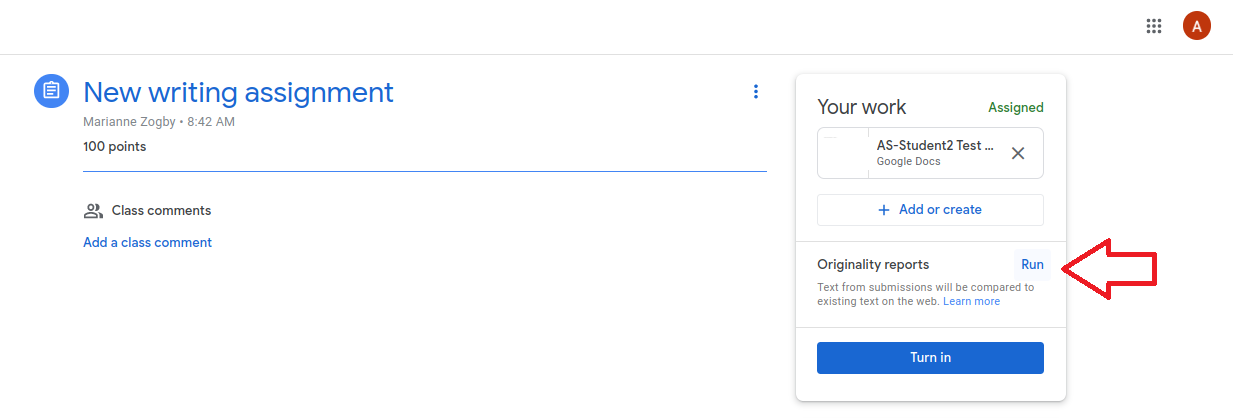
Some teachers have used the digital tool Turn It In to verify originality of student work.  Unfortunately Franklin no longer has a student privacy agreement with Turn It In and it will be unavailable in the future for use with students.  As an alternative, it is recommended that teachers start using the built-in originality report in Google Classroom.  If you are unfamiliar with this feature, please see the resources below and feel free to reach out to the DLI team for further assistance.


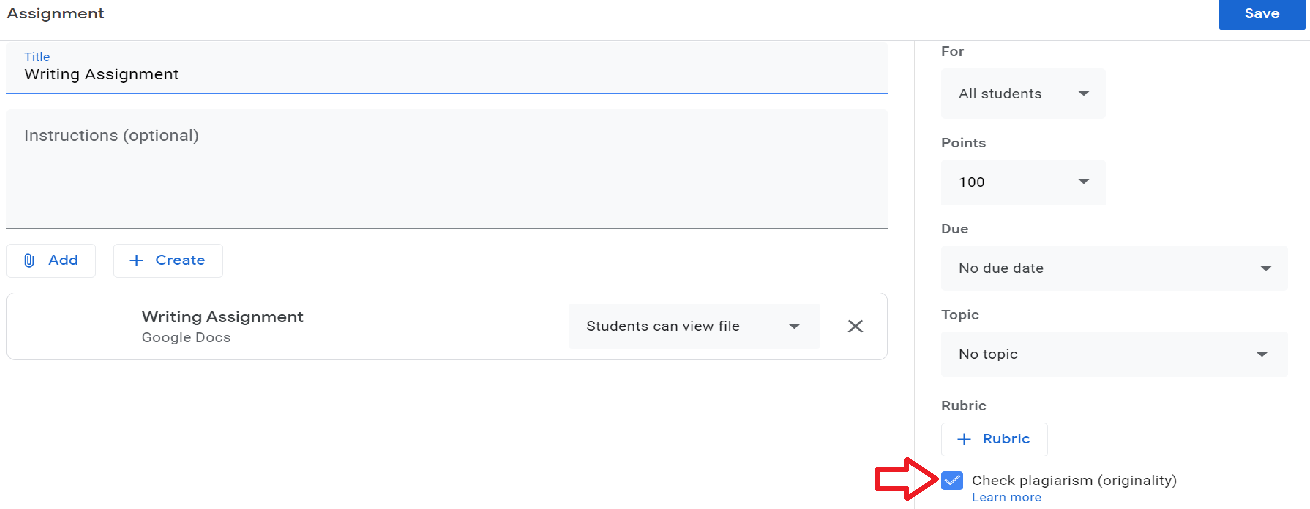
Teachers can turn on the plagiarism report in Google Classroom when creating an assignment.


Students will be able to run up to 3 originality reports before turning in their work.


Resources:


Teacher: Turn on Originality Reports in Google Classroom

Student: Run an Originality Report on your work

Friday, December 11, 2020

Maintaining Connections during Hybrid and Remote Learning

In a typical school year, 8th grade ELA teacher Lauren Berolini can be found meeting one-on-one with students for writers' conferences. Ms. Berolini uses this format to provide specific, authentic feedback in a private and personal setting and values the opportunity it provides to make personal connections with students. In an effort to maintain these personal connections as students develop their writing skills in this hybrid and remote setting, Ms. Berolini requested help from the Digital Learning Integrationists to identify digital tools for providing feedback to students. Together they explored Mote, a google extension that enables voice note feedback within Google Classroom, Google Docs, Sheets and Slides. Though the
"conversation" takes place asynchronously, it allows for a more personal interaction between the teacher and student than simple text commenting alone. Ms. Berolini reported that with this time saving tool, she was able to provide detailed, authentic feedback and that students responded well to the verbal format. Mote is free, data privacy approved and easily installed by clicking on the image here.  Mote voice comments are also automatically transcribed to text which, in turn, can be translated to many languages, making this an exceptional resource for both Special Education and English Language Development teachers as well. The DLI team is available to support teachers interested in exploring this feedback tool. Watch this quick video (1:31) to learn more.

Friday, December 4, 2020

Use Formative to Streamline Your Feedback to Students

FPS teachers are constantly seeking better ways to improve learning for their students. One digital resource they are beginning to explore more deeply is Formative.  This tool offers teachers the ability to build assignments and assessments so they can follow student progress and provide live feedback.

Teachers can use their own content or a bank of content within Formative to create opportunities for students to demonstrate their understanding.  When developing their own content teachers can use entire Formatives created by others, individual questions from a content bank, or create custom Formatives using their own questions.

Teachers can view work individually by student, side-by-side with other students, or by question.  This information can be seen as the students are completing their work, allowing the teacher to intervene immediately.  Feedback can be given to students in a variety of forms: written, voice, or video.

Color coding within formative allows teachers to see when a student needs intervention.  It also allows the teacher to follow students' progress in regard to learning standards.